Summary: in this tutorial, you will learn about the C pointer, an essential concept in the C programming language. Pointers give you a flexible and powerful way of manipulating data in your programs.
Introduction to C Pointer #
When you define a variable, the compiler allocates the memory space to hold that variable’s value. The memory location of that variable has a unique address.
For example, when you define a variable x with the type integer:
int x = 10;Code language: C++ (cpp)The variable x resides in the memory with a unique memory address. To get the memory address of the variable x, you use the unary operator & as follows:
&xThe following displays the memory address of the variable x:
printf("The memory address of x is %p\n",&x);Code language: C++ (cpp)The result depends on the computer where the program runs. For example, the memory address of x on our computer is:
The memory address of x is 0028FF1CCode language: C++ (cpp)Becausethe memory address of x is a hexadecimal number (28FF1C), you can use another variable to store it e.g., px as the following picture:
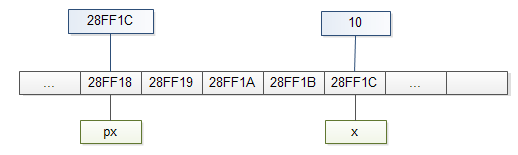
In C, we say that px variable points to x variable, or px is a pointer to x.
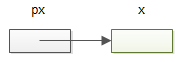
By definition, a pointer is a variable that holds the memory address of another variable.
Declare a pointer #
Like a regular variable, you must declare a pointer before using it. The following shows the syntax of declaring a pointer:
type *pointer;Code language: C++ (cpp)First, specify the type of variable to which the pointer points. The type can be any valid type in C such as int, char, and float.
Second, place the asterisk (*) in front of the pointer name to indicate that this is a pointer.
Third, specify the name of the pointer. The name of pointers needs to follow the naming rules of variables.
By convention, the pointer name begins with the letter p to help distinguish between a pointer and a variable. But it’s not required.
The following example declares a pointer that points to an integer variable:
int *pint;Code language: C++ (cpp)Note that the * can be next to the int, between the int and the pointer name, or in front of the pointer name. The following declarations are the same:
int* p1;
int * p1;
int *p1;
If you declare multiple pointers, you need to place the asterisk (*) in front of each pointer name. For example:
int *p1, *p2;However, the following declares a pointer that points to an integer variable (p1) and an integer variable (p2). The variable p2 is not a pointer.
int *p1, p2;Initialize a pointer #
If you declare a pointer without initializing it, you have an uninitialized pointer.
To initialize a pointer, you assign the memory address of another variable to the pointer using the address-of operator ( &) as follows:
pointer = &variable;Code language: C++ (cpp)For example, to assign the address of the variable x to the pointer px, you use the following syntax:
px = &x;Code language: C++ (cpp)Use a pointer #
After initializing a pointer, you can manipulate the variable that the pointer points to using the indirection operator ( *).
For example, you can access the value of x through the px pointer as follows:
printf("%d",*px);Code language: C++ (cpp)and you can change the value of x through the px pointer:
*px = 20;

printf("*px = %d\n",*px); // 20
printf("x = %d\n",x); // 20Code language: C++ (cpp)
In C, accessing the value of a variable through the variable name is called direct access, while accessing the value of a variable through a pointer is known as indirect access or indirection.
Putting it all together.
#include <stdio.h>

int main()
{
    int x = 10;
    int *px = &x;

    printf("x = %d\n", x);     // 10
    printf("*px = %d\n", *px); // 10

    // change the value of x via the pointer
    *px = 20;

    printf("x = %d\n", x);     // 20
    printf("*px = %d\n", *px); // 20

    // Examine memory address of x and px
    printf("The memory address of x is %p\n", &x);
    printf("The value of the pointer px is %p\n", px);
    printf("The memory address of the pointer px is %p\n", &px);

    return 0;
}Code language: C++ (cpp)
The following is the output of the program:
x = 10
*px = 10
x = 20
*px = 20
The memory address of x is 000000000061FE1C
The value of the pointer px is 000000000061FE1C
The memory address of the pointer px is 000000000061FE10
Summary #
- Pointers are variables that hold the memory addresses of other variables.
- Using the pointers, you can manage the values of the variables indirectly.

